CHEXX App and Mobile Access in Kenya
CHEXX can be accessed through the normal website, an installable Progressive Web App (PWA), Windows and MacOS desktop clients, and a Telegram Mini App through @ChexxBetBot. A native Google Play or Apple App Store app is not listed. CHEXX provides PWA installation instructions for Android, iOS, Windows and MacOS using supported browsers, so users can choose between zero-install web access and an app-like home-screen experience.
The full picture is in our CHEXX review for Kenya.
Ways to access CHEXX
| Access route | Installation requirement | Platform type |
|---|---|---|
| Website / mobile browser | No installation | Standard web access |
| PWA | Installed from a supported browser | Progressive Web App on phone or computer |
| MacOS / Windows desktop route | Client or browser-installed PWA | Computer access |
| Telegram Mini App | Telegram plus @ChexxBetBot | Gaming bot / Mini App route |
Access method and promotional rewards are different choices. A PWA or Telegram reward does not make one access route safer, faster or more reliable than another.
Mobile website: the simplest route
The CHEXX website is the simplest zero-install route on mobile. Casino, sportsbook and esports use the same CHEXX account, so web access does not create a separate product or account.
Web access is useful if you want to inspect CHEXX before installing anything. Because CHEXX does not list a native Google Play or Apple App Store app, avoid third-party APK or download mirrors that present themselves as official store packages.
Mobile access does not change the cashier: CHEXX remains crypto-only with 11 supported crypto assets. See CHEXX payments and crypto deposits for deposit details.
CHEXX PWA: install the website as an app-like experience
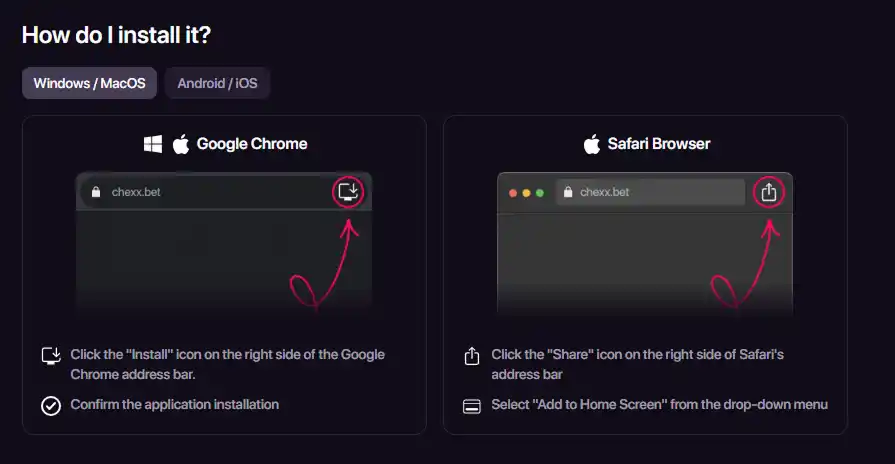
For users who want an app-like experience without a native store listing, CHEXX offers a Progressive Web App. CHEXX provides PWA installation instructions for Android, iOS, Windows and MacOS. Supported browsers include Google Chrome across those platforms, Safari on iOS and MacOS, and Samsung Internet on Android.
PWA installation depends on the browser and device. CHEXX directs Chrome users to an install or home-screen action, Safari users to sharing and home-screen or dock actions, and Samsung Internet users to its add-to-home-screen route.
PWA is not the same as an App Store listing
A PWA is installed through a supported browser. CHEXX does not list a native Google Play or Apple App Store app, so a PWA should not be confused with an official APK or store package.
The official CHEXX PWA instructions show the installation flow for supported browsers and devices.
Windows and MacOS access
CHEXX lists MacOS and Windows desktop clients. Its PWA can also be installed through supported browsers on both operating systems.
Desktop users can choose the normal website, a browser-installed PWA or the listed desktop clients. The best fit depends on whether you want ordinary web access or an installed experience.
Sportsbook, esports and casino are product areas within the same CHEXX platform rather than separate applications.
Telegram Mini App through @ChexxBetBot
@ChexxBetBot is the CHEXX gaming bot for casino and sports access inside Telegram.
@ChexxBetBot is used for gaming access, while @ChexxSupportBot is used for customer support. Confirm the handle before interacting with either bot.
@ChexxBetBot
Gaming / Telegram Mini App access.
@ChexxSupportBot
Customer-support bot.
Telegram is simply another access method; it does not change the crypto-only payment model or account requirements.
Action rewards are a promotion layer, not an installation requirement
CHEXX promotions can include rewards tied to PWA installation or Telegram subscription. Check the live promotion terms for wagering, validity and cashout conditions before relying on an action reward.
For current action rewards, see CHEXX bonuses. The access method itself remains available whether or not a promotion is active.
Native app-store availability
CHEXX does not list a native app in Google Play or Apple’s App Store. Its app-like options are the PWA and Telegram Mini App, with desktop routes also available.
Avoid unfamiliar APK files, mirror downloads or unofficial store listings that are not linked from CHEXX. Use the official website, PWA instructions or official Telegram handle instead.
Which CHEXX access route fits which use case?
| If you want… | Most relevant route | Reason |
|---|---|---|
| No installation | Website / mobile browser | Open the standard CHEXX site directly |
| Home-screen or app-like browser installation | PWA | CHEXX provides PWA installation instructions for Android, iOS, Windows and MacOS |
| Computer use | Website, browser-installed PWA, plus MacOS/Windows client routes | Desktop users can choose browser, PWA or listed client routes |
| CHEXX inside Telegram | @ChexxBetBot | Telegram Mini App / gaming route |
| Help through Telegram | @ChexxSupportBot | Support channel rather than gaming access |
Choosing between web, PWA, desktop and Telegram is mainly about convenience and device preference. Account, payment and product terms remain the same across those access routes.
Registration and KYC
For signup methods, age requirements and KYC triggers, continue to CHEXX registration.
An access method does not determine which identity documents might be requested. Follow any verification instructions shown on your own account.
Comparing the four CHEXX access routes
CHEXX’s canonical access model includes the website, an installable PWA, MacOS and Windows desktop clients, and Telegram Mini Apps. These are different ways to reach the same product environment, not four different account types. The choice is therefore mainly about convenience and device preference.
The mobile website is the lowest-friction option because it does not require an installation step. The PWA adds an app-like launcher while remaining a web technology. Desktop clients serve users who prefer a dedicated computer route, and the Telegram option places access inside the Telegram environment through @ChexxBetBot.
Why PWA and native app should not be confused
A PWA can be installed to a device and can look app-like from the home screen, but that does not make it a native Google Play or Apple App Store application. The canonical dossier explicitly does not include native store apps. For that reason, the page should never invent an APK download, a Play Store listing or an App Store listing.
This distinction solves a common search-intent problem. Someone asking for the CHEXX app may actually want a quick mobile shortcut rather than a store listing. The PWA can answer the first need, while the second is not supported by the verified facts.
Telegram gaming and Telegram support are separate
@ChexxBetBot is the gaming/access bot referenced for the Telegram Mini App route. @ChexxSupportBot is a support contact. Keeping those roles separate prevents a user from treating the support bot as the gaming interface or the gaming bot as the dedicated support channel.

The same separation matters when action rewards are discussed. The plan records PWA-install and Telegram-bot subscription actions that each award 10 free spins at 0.2 USD, with 1x wagering, seven-day validity and a 20 USDT maximum cashout. Those are promotion mechanics attached to specific actions; they are not a requirement for using the PWA or Telegram route.
Which route fits which use case
A browser-first user can stay with the mobile website. Someone who wants a home-screen shortcut can use the PWA. A desktop-focused user can consider the MacOS or Windows clients. A Telegram-heavy user can use the Mini App route. None of these access choices changes the fact that CHEXX uses the same account and crypto-based cashier.
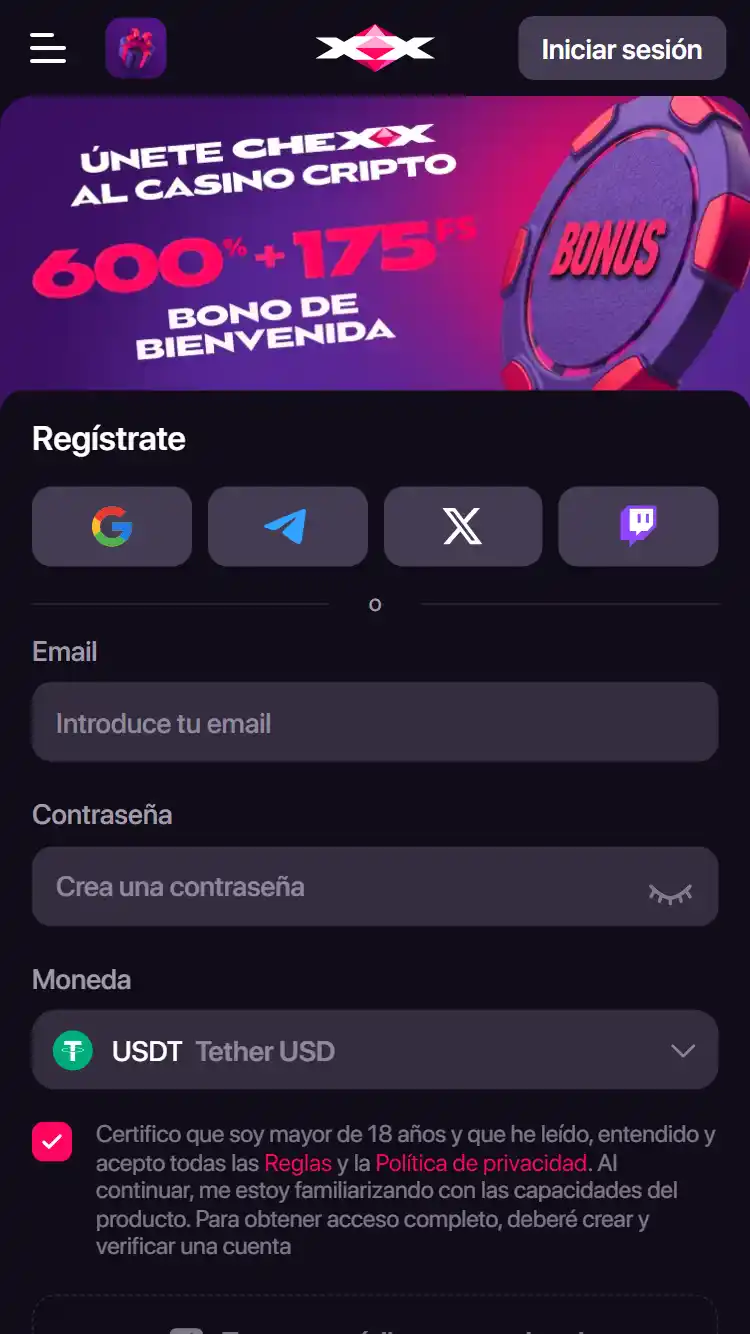
Registration is a separate step from access mode. Email, Google, Telegram and WalletConnect are the verified signup choices, while the access routes describe where the account can be used afterward. Keeping those layers separate makes the mobile guide more precise and avoids implying that installing the PWA automatically creates or verifies an account.
Access mode does not change the product facts
Whichever route is used, the surrounding CHEXX account remains the same product environment. Moving from a browser to the PWA does not create a new cashier, change the supported crypto assets or remove the 21+ account threshold. The Telegram Mini App is also an access route rather than a separate betting operator.
This is useful when comparing devices. A player can choose a route for convenience without re-evaluating the casino, sportsbook or payment model from scratch. The main differences are how the interface is reached and whether the user wants a browser tab, an installed PWA shortcut, a desktop client or Telegram-based access.
Installation language should stay precise
The word “install” can describe the PWA action, but it should not be rewritten as a Play Store or App Store download. Likewise, the existence of desktop clients does not imply a mobile APK. The verified route list is complete enough to answer the app question without inventing an additional download channel.
The action rewards attached to PWA installation and Telegram subscription are optional promotion mechanics. They can add a reward to a specific action, but they do not change which access modes exist or make one route mandatory.
Choose the access method that fits you
Start with the official CHEXX website, decide whether web access is enough, and then consider PWA or Telegram for convenience. Avoid unfamiliar APK or store listings, and confirm the Telegram bot handle before interacting with it.
For a wider view of CHEXX in Kenya, return to the CHEXX overview.
An account comes first: registration.
 Trickstar SpinsYggdrasil Gaming
 The Book of AmaterasuMascot Gaming
 Wild FudgeBetixon
 9 Arrows of OdysseusSpinOn
 Sugar LandFelix Gaming
 Sweet RewardBF Games
 Astro GemsMaverick
 Sizzling Hot DeluxeNovomatic
 Hercules Power WildFugaso
 Wild PharaohSwintt
 Love Gems Hold and Win1spin4win
 Beef Up the Bonus Power ComboHigh Limit Studio
 CleopatraIGT
 Rich WorldAmusnet
 Maneki FortunesSkywind Group
 Blackjack 21 ClassicClassic
 Premier Blackjack with Side BetsSide Bet
 American BlackjackClassic
 Multihand BlackjackMultihand
 Vegas Downtown Blackjack GoldGold Series
 Atlantic City BlackjackClassic
 Vegas Strip BlackjackClassic
 Single Deck Blackjack GoldSingle Deck
 Quantum Blackjack PlusMultiplier
 Perfect Pairs BlackjackSide Bet
 European BlackjackMultihand
 Double Exposure BlackjackDouble Exposure
 Blackjack Lucky LadiesSide Bet
 Turbo BlackjackFast-play
 Blackjack Surrender OriginsSurrender
 Mega Fire Blaze RouletteMultiplier
 Auto RouletteSwitch Studios
 Lucky RouletteClassic
 Multifire RouletteMultiplier
 European RouletteClassic
 Immortal Romance RouletteThemed
 French RouletteNetEnt
 Double Ball American RouletteDouble Ball
 American RouletteClassic
 RouletteRelax Gaming
 Who Wants to Be a Millionaire RouletteThemed
 Quantum RouletteMultiplier
 Gold RouletteGold Series
 Dragon RouletteThemed
Written by the editors at Chexx Casino.